

When the install becomes a problem
You planned a clean, four-camera mobile DVR rollout for a regional carrier and then the first vehicle came back with corrupt footage and a dead battery. I’ve seen that scenario more than once; poor planning turns a simple install into a month-long troubleshooting cycle. If you’re pairing cameras and telematics, include GPS fleet trackers from the start so location timestamps align with video. Large-scale fleets in the North American trucking industry expect reliability; short cuts cost time and trust.
Power and mounting — foundation first
Ask two direct questions: where will the DVR get constant power, and how will it survive vibration? Secure a fused ignition-switched circuit and a continuous power source for long parking recordings. Hard-mount the unit to the vehicle frame or a reinforced bracket; loose mounts cause connectors to fail. Check these points before any wiring begins: battery average draw in idle; recommended fuse rating; mounting point clearance from heat sources or moisture.
Camera placement and wiring — see what matters
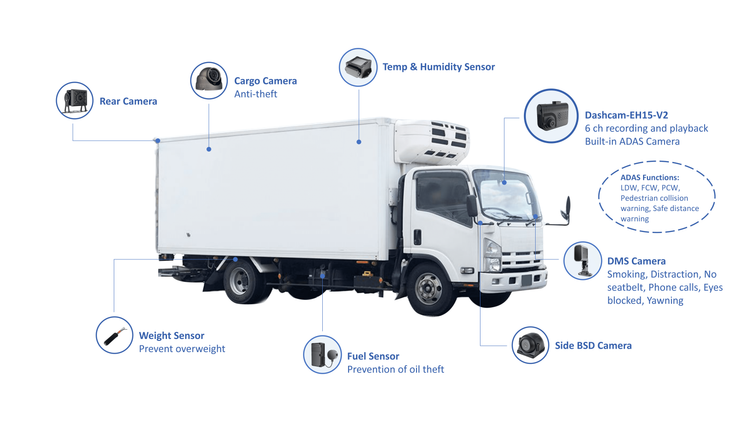
Decide the purpose for each of the four channels — forward-facing, driver-facing, two side/rear views — then place lenses to minimize glare and blind spots. Run cables away from high-heat and high-current lines. Use sealed connectors and heat-shrink on solder joints. Quick checklist: lens height and angle; cable routing path and clips every 12–18 inches; camera IP rating appropriate for exterior exposure.
DVR configuration and storage — set limits, log what counts
Configure recording resolution and overwriting rules before you close the dash. High resolution fills storage fast; choose codec and bitrate to balance clarity and retention. Use pre-event and post-event buffers on each channel. Verify the DVR’s file integrity check and set automatic file fragmentation repair, if available. Include a storage audit: expected GB/day per channel; retention days required; scheduled manual backups.
Connectivity and remote access — real access, not paper promises
Decide whether live view and cloud upload are required. If cellular will be used, test signal strength in real routes and set up failover to local storage when coverage drops. Secure remote access with account-level authentication and unique credentials for each vehicle. Confirm firmware update paths: remote push versus physical updates during maintenance stops.
GPS sync and telematics integration — clocks must agree
Video without accurate location is a puzzle. Synchronize DVR timestamps with your telematics feed and confirm coordinate accuracy in replay. Integrate the DVR with your chosen fleet gps tracker system so events tie directly to route data; test by driving a short loop and comparing route traces to video timestamps. Verify the recorder logs GPS loss events and flags them in the system.
Testing, validation, and handover — prove it in the field
Run these acceptance tests before you hand the vehicle back: a 30–60 minute live route test with high-resolution recording on all channels; a power-cycle and cold-start test; a night and glare test; simulated impact/harsh-braking event to verify event-tagging. Deliver a simple test report and a quick user sheet that shows how to pull an incident clip and who to contact for firmware or storage issues.
Common pitfalls installers stumble into
They assume one firmware fits all vehicles; they skip ground integrity tests; they forget to lock down admin passwords; they set uplink rates that chew through cellular plans. Avoid these: standardize firmware and configuration templates; verify chassis ground at the mounting point; enforce per-vehicle credentials; set cellular caps and test upload behavior under throttled bandwidth.
What to expect after deployment
Track three metrics in the first 90 days: uptime of each DVR, percentage of incidents with complete multi-channel footage, and average time to retrieve an incident clip. Use those numbers to refine your install checklist. Field experience matters; installers who iterate on the checklist after each project reduce callbacks and evidence gaps.
Final note
A 4-channel DVR project succeeds when the team treats power, placement, sync, and verification as equal priorities. That clear approach reduces human error and preserves the footage that matters — the same practical discipline that customers notice when they work with BSJ.